Most companies that try agents end up with a few chats that each do one job. The rules sit in a prompt only one person has seen, the work happens where the team can't see it, and nobody checks whether the agent still does what it should. That works for one agent. It stops working at three, and it never works when agents have to hand work to each other or to your people.
Managing agents means giving each one what you give a new colleague: a job, an owner, written procedures, a place where its work shows up, and a person who reviews it. Tooling Studio puts those in Google Workspace, next to the tasks, customers and goals your people already work on, and connects them to the AI assistant you already use through MCP.
Get the founder pack: six free skills that take you from your company's strategy to agents doing the work, with each step building on the one before.
What an agent needs before it can work with your team
| What the agent needs | Where it lives in Tooling Studio |
|---|---|
| A job and limits: what it may do alone, when it asks, what it never does | One page per agent in the Brain, read by the agent before every run and by your team |
| A person who owns it | Named on the agent's page and on its card |
| A place where its work shows up | Cards on a Kanban Tasks board, tagged as agent work, next to the cards of your people |
| Customer data it can read and update | Sales CRM contacts, organisations and deals |
| A reason to do the work | This quarter's goals in OKR, with every card linked to the key result it moves |
| Access to all of this | Your assistant connected through MCP, with the permissions of the person who connects it |
| A check | A weekly or monthly review of what it did, what was corrected and what it cost and saved |
The Brain is in early access. Until you have it, the same pages can live as files in a shared Google Drive folder, although nothing stops two copies of one rule from appearing there.
How agents and people coordinate the work
Agents and people work on the same boards and follow the same card rules: every card has an owner, a due date and a line that says when it is done. An agent that drafts something leaves it on a card for a person to approve. When an agent needs an answer, it comments on the card and tags the person.
Agents can also check each other. When one agent adds new leads to the CRM, a second agent can check them for duplicates, missing fields, an owner and a stage. The same checks work on people: suggestions nobody answered and meetings without notes.
Anything that reaches a customer, moves money or can't be undone stays a draft that a person approves, unless you decide otherwise and write that on the agent's page.
From strategy to working agents in six steps
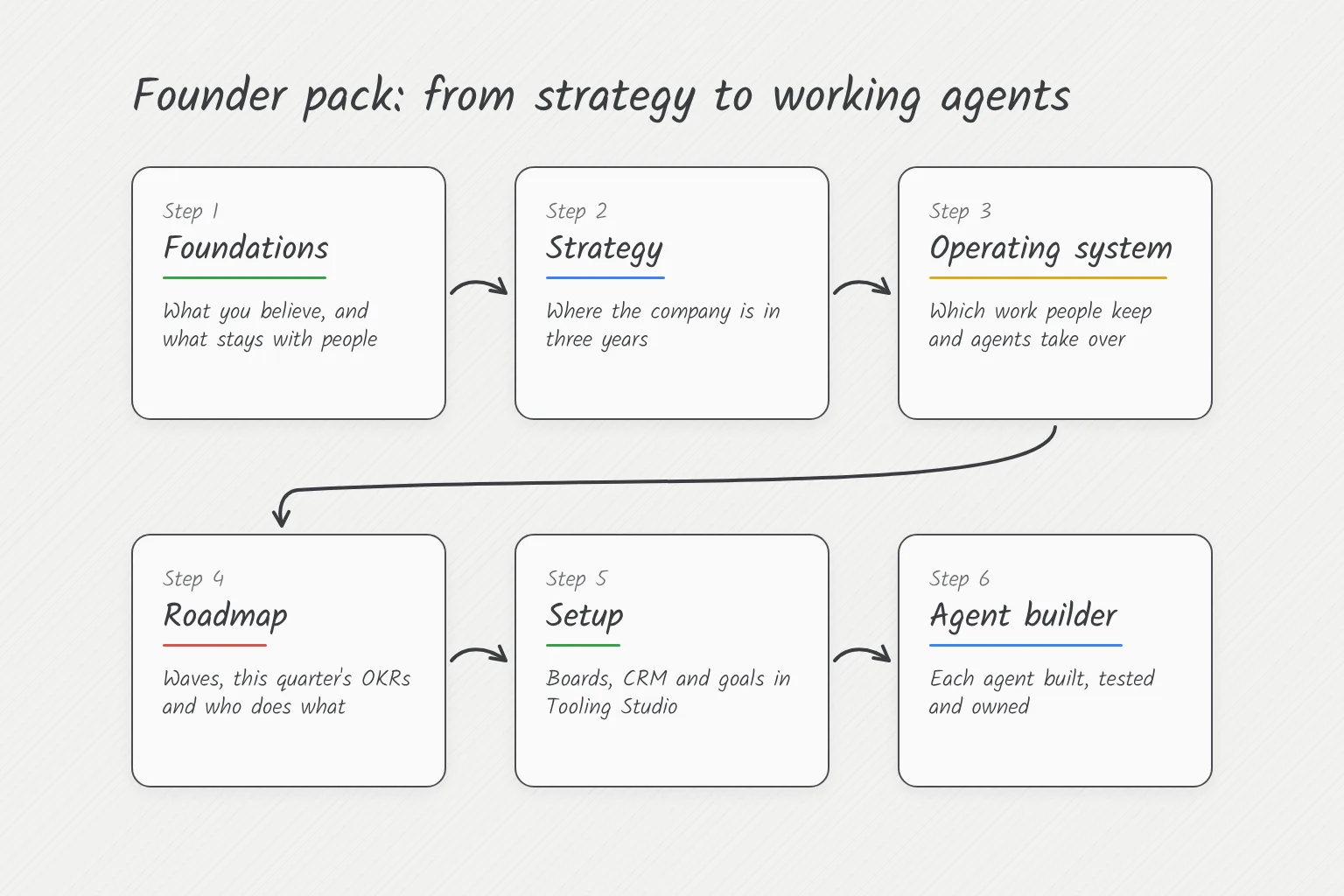
The founder pack builds this setup from your own company. Each skill runs in your AI assistant, writes one document and hands it to the next step.
- Foundations: what your company believes and which work stays with people.
- Strategy: a three-year plan for your company with AI.
- Operating system: which work your people keep, which work agents take over, and your first agents with their owners.
- Roadmap: the change in waves, this quarter's OKRs and who does what, within the hours your team has.
- Setup: your boards, CRM pipelines, goals and agent rules built in Tooling Studio.
- Agent builder: every agent built and tested with the person who knows the work, then reviewed while it runs.
The first four steps work with any tools. From step 5 the plan runs in Tooling Studio. A seventh skill, the mentor, is for you as a founder rather than for the company.
An example: nineteen agents at Ekipa
Ekipa, a coaching company in Southeast Asia that is being rebuilt as an AI-native company, has nineteen agents in its operating system. In Tooling Studio each one is a card on an agents board, in a list for Planned, Building or Paused, with the wave of the roadmap it belongs to. They range from a card checker that looks every day whether each card has an owner and a due date, to bookkeeping and tax filings later in the roadmap. The first two being built are an agent that finds people to meet and one that keeps the CRM current and checks the first. Read the case study: Nineteen agents on a board, and the two we build first.
Who this is for
Companies of 5 to 100 people that run on Google Workspace and want agents to take part of the work without losing track of it. The skills work in Claude, ChatGPT, Gemini and Copilot. Connecting agents to Tooling Studio works best in Claude, and in ChatGPT depending on your plan.
Agent management questions
What is AI agent management?
Deciding which work each agent does, writing its rules down, giving it an owner, making its work visible to the team and reviewing it. The rules are its standard operating procedure, and they should live where your people can read and change them.
Where should an agent's SOP live?
In one place your people and your agents both read. In Tooling Studio that is one page per agent in the Brain, which keeps every version with who changed it. The agent reads its page before each run, so a change to the page changes the agent on its next run.
How do agents coordinate with each other?
Through the same boards and records your people use. One agent's output is a card or a CRM record that the next agent picks up or checks. Nothing depends on agents talking to each other in a hidden channel.
Can agents act on their own?
Only within what their page allows. An agent usually starts by drafting while a person approves, and gets more room one action at a time when the checks show it can.
Do I need to code?
No. The skills run in your AI assistant, and the connection to Tooling Studio is a connector you add in its settings.
What does it cost?
The skills are free. Tooling Studio has its own plans.
Next step
Keep this workflow close to Gmail instead of pushing it into another stack
Tooling Studio is built for teams that already work in Google Workspace and want a lighter execution layer without another bloated platform rollout.