Partner Program

Earn Recurring Revenue on Every Google Workspace Seat, Forever

Tooling Studio is a Google Workspace productivity and collaboration platform built inside Gmail. As a registered partner, you earn more than 25% lifetime recurring commission on every paid product seat you deploy, with no development work, no separate login to manage, and no support burden on your team.

Qualified Google Workspace resellers, MSPs, and consultants can apply below. We review every application within one business day and respond with your partner agreement, discount vouchers and ten free seats for your own domain.

What you earn, concretely

$125.00/month

50 seats × 2 products × $5/user/month × 25% partner margin

Recurring, per client, in perpetuity. Kanban Tasks and Sales CRM are each billed per user per month, so clients can subscribe to one or both products. Commission is paid monthly via Stripe.

Products included $5/user/month each
  • 25% partner margin
  • Paid monthly via Stripe
  • 10 free seats for your domain
  • Priced per user per month per product
We can also partner to build custom solutions for your clients

Add Predictable, Recurring Revenue to Every GWS Seat You Manage

Gain an Additional Revenue Layer From the Products You Already Sell

Google Workspace resellers and MSPs have traditionally relied on two revenue streams: one-time licence sales and recurring managed services. Tooling Studio instantly creates a third, predictable, and recurring revenue layer that transforms your client relationships.

Google Workspace's retention rate creates a durable revenue base. Most resellers capture only the licence margin from that retention. Tooling Studio lets you capture software margin from it too: recurring, scalable, and compounding over the life of each client.

A sample partner portfolio:

$250/month recurring

5 clients × average 40 seats × 1 product × $5 × 25% margin

$1,000/month recurring

10 clients × average 40 seats × 2 products × $5 × 25% margin

These figures compound as clients grow their seat count or add the second product. Commission is recalculated monthly based on active paid product seats.

Capture a third recurring software margin

Earn a scalable software margin on every product seat your clients add, with no additional delivery or support cost on your part. At $5 per user per month per product, this easily fits into existing Workspace proposals as a high-value add-on.

Leverage client stickiness to Google Workspace

Businesses rarely leave Google Workspace due to high switching costs. When you extend their environment with purpose-built tools for project management and sales tracking, you can monetize that commitment.

Achieve durable revenue

This materially sticky relationship means your clients have fewer reasons to switch providers. As clients grow and add users, your software margin grows with them, with no additional delivery or support effort required.

Differentiate your offering

Including Tooling Studio differentiates your proposal from competitors who are competing on price alone, leading to shorter sales conversations and higher client acceptance.

Your Clients Stay Yours.

Google Workspace partner meeting with clients in a bright office

Every client account you register is permanently attributed to your partner ID. Tooling Studio does not sell directly to accounts you bring in, and we do not engage in outbound outreach to your registered clients.

Accounts registered under your partner ID are locked to your revenue for the lifetime of the subscription. There are no territory restrictions. You can register accounts globally, and our seat-tracking dashboard shows your portfolio, commissions earned, and payout history in real time.

Product overview

Deliver the Best Google Workspace Experience

Tooling Studio adds two high-demand capabilities directly into your clients' existing Google Workspace environment, with no new accounts, no new apps to install, and no change to their existing workflows.

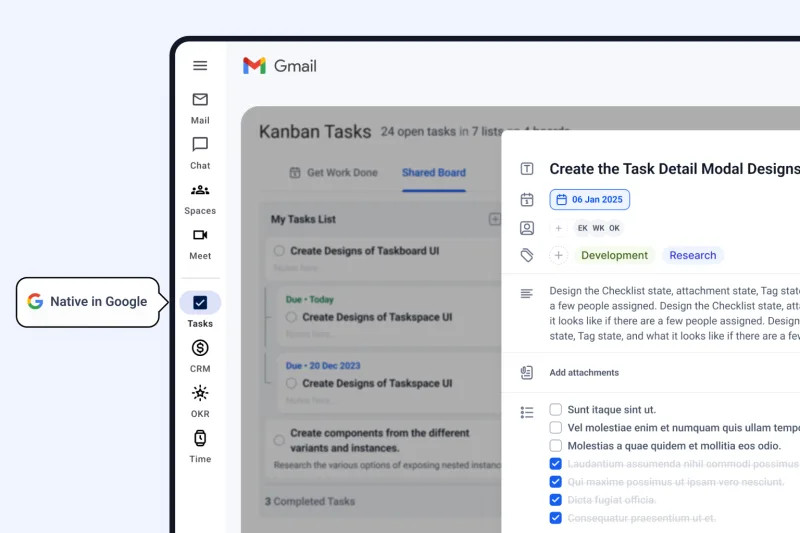
Kanban Tasks: Visual project management, inside Gmail

Kanban Tasks product interface inside Google Workspace

All in one place: Teams stop losing focus by jumping between applications because project tasks live directly inside their Gmail interface.

Shared board visibility: Every team member sees the same priorities, which prevents work from being duplicated or falling through the cracks.

Built for real workflows: Custom fields, tags, and file attachments are available out of the box to support complex professional workflows without additional configuration.

Efficient and accessible: Clients receive powerful project tracking at half the cost of standalone tools like Asana or Trello, maximizing their software budget.

View Kanban Tasks

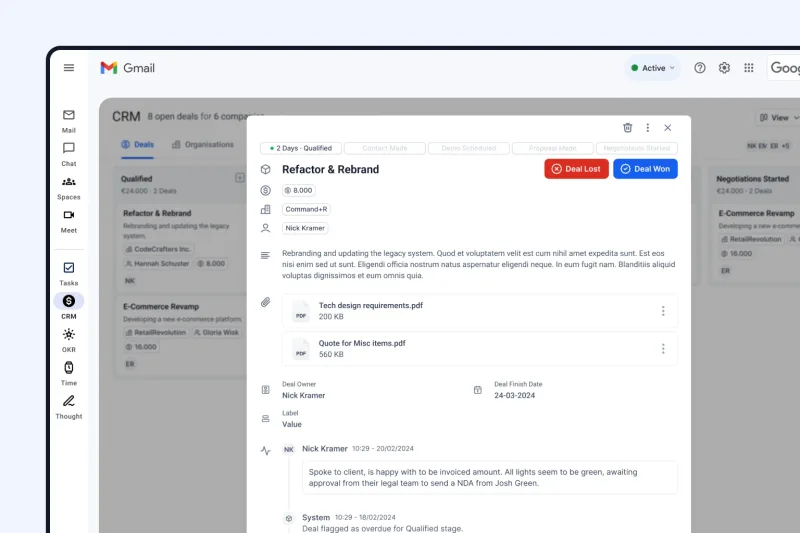
Sales CRM: Pipeline tracking, right in the Gmail sidebar

Sales CRM product interface inside Gmail

Seamless integration: Teams track deal stages, add notes, and view contact history directly from the Gmail sidebar, reducing human error and application switching.

Sync with Google Contacts: The CRM syncs with Google Contacts, so existing contacts are ready for immediate use without manual re-entry.

Faster follow-ups: Representatives close more deals faster because full deal context opens instantly when they need to follow up.

Instant adoption: The CRM feels native to Gmail, saving training time and helping sales teams keep using it after deployment.

View Sales CRM

One Chrome Extension, Deployed in Two Minutes

Both tools are delivered via a single Chrome Extension, making it one of the more practical productivity tools that a Google Workspace administrator can push.

  • Partners deploy to an entire client organisation from the Google Admin console in under two minutes.
  • Users sign in with their existing Google account and boards go live immediately.
  • There is no configuration, no onboarding portal, and no training requirement beyond a brief walkthrough.
View the Kanban Tasks Chrome Extension

Custom solutions

We build what your clients need. You deliver it. Everyone wins.

When a client request goes beyond the standard product, bring it to us. We scope it, build it, and ship it under your engagement. Your client gets what they need and you earn commission on every seat it touches.

Custom integrations

Connect Tooling Studio to the other tools in your client's stack.

Tailored workflows

Bespoke board structures, pipeline stages, and automation rules built to spec.

Reporting and dashboards

Custom views and management reports for your client's specific metrics.

AI automation

Triggered workflows from Gmail, calendar events, or CRM updates.

No need to hire developers or make promises you can't keep. We develop a solution that fits your client's needs and you can deliver through your practice.

Business Process Automation, Built Into the Tools Your Clients Already Trust

Google Workspace partner reviewing business process automation with clients

Most AI tools can only answer questions. With Tooling Studio MCP, your clients' AI can take action, updating records, moving deals, creating tasks, and keeping everything current without anyone lifting a finger.

Your clients' teams save valuable time by eliminating manual data entry, allowing them to focus on meaningful work rather than routine record maintenance.

Teams gain clear and trustworthy CRM and task data because AI automatically manages administrative tasks and reduces human error.

End users make faster, more confident daily decisions because they receive instant answers about priorities, pipeline status, and open tasks, without searching for critical context.

Users can immediately leverage more powerful tools without new training because the platform plugs directly into the AI assistants they already use daily.

What your clients can do:

Sales teams

A CRM that updates itself after every interaction.

Reps can delegate repetitive tasks to their AI agents so they can focus on closing. Deals move forward, notes get recorded, and follow-ups get scheduled automatically so nothing slips through the cracks.

"Scan the unread emails in my inbox. Update contact records, qualify leads, and create tasks on my CRM based on the conversations."

Project teams

Meetings become tasks before the call even ends.

Action items, owners, and deadlines are captured and assigned automatically, so teams leave every meeting with a clear plan rather than a list of things to sort out later.

"Read the latest developer stand up call transcript. Create tasks on our project management system based on what was discussed. Set due dates, assign responsibilities, and create tags when relevant."

Partner benefits

What you receive as a Tooling Studio partner.

Commission rate
25% of net subscription revenue per paid product seat, paid monthly.
Payment schedule
Monthly, via Stripe. No minimum payout for active partners.
Free seats
10 free seats on your own domain from day one, so you can use the product before you sell it.
Client protection
Registered accounts are attributed to your partner ID permanently. Your clients remain 100% yours.
Deployment time
Under two minutes via the Google Admin console with a straightforward, simple setup.
Support burden
Minimal. The product requires no end-user training and no separate login management.
Partner resources
Sales deck, demo environment, special discount vouchers, and a dedicated partner contact included.
Seat tracking
Real-time dashboard showing your registered accounts, active seats, and commission history.
Agreement
One-page e-sign partner agreement. No multi-year lock-in.

Who Your Clients Are, and Why They Convert

The clients most likely to adopt Tooling Studio share a common constraint: they need structured project management and sales tracking, but they cannot justify the cost, complexity, or onboarding overhead of a dedicated platform.

You can show them that the tool they need is already where they work.

Client types that convert fastest:

Founder and operations lead reviewing lightweight productivity software in a startup workspace

SMBs and Startups

Small and mid-sized businesses running on tight operational budgets are the strongest conversion opportunity in your portfolio.

  • They have outgrown spreadsheets but have no appetite for an Asana, Monday, or Salesforce implementation.
  • Tooling Studio sits at $5 per user per month per product with minimal technical requirements to implement.
  • For a founder or operations lead evaluating tools, that combination closes fast.
Sales team reviewing pipeline follow-ups from inbox-style tools in a huddle room

Sales Teams

Any sales team operating out of Gmail is managing a pipeline in a tool that was not built for it.

  • Tooling Studio gives them a native CRM without asking them to leave their inbox, learn a new system, or migrate their contact data.
  • Their reps are already in Gmail, and the friction of not having a structured pipeline is already costing them deals.
Agency team coordinating multiple client projects in a creative studio

Agencies

Software development, marketing, PR, and creative agencies run multiple concurrent client projects and need task visibility without an enterprise project management suite.

  • Because Tooling Studio lives inside Google Workspace, there is no per-project setup, no seat negotiation with a separate vendor, and no context-switching for their teams.
  • Agencies also tend to grow headcount in bursts, which means seat counts and your commission scale with them.
Independent professional managing client work from a laptop in a coworking space

Freelancers and Independent Professionals

Solo operators and small practices managing client relationships and deliverables inside Gmail are underserved by tools priced and designed for teams.

  • Tooling Studio's free personal tier creates an entry point, and conversion to paid product seats happens naturally as they bring on collaborators or grow into a small team.
  • These accounts are small individually but require almost no sales effort and no support burden.
Education coordinators planning course deliverables and student projects

Educational Institutions

Schools, universities, and training organizations running on Google Workspace for Education are a natural fit for Tooling Studio.

  • Administrative and operations teams managing multiple workstreams benefit directly from native task tracking without introducing a separate platform.
  • Faculty and department coordinators can manage course deliverables, track student projects, and coordinate internally.
  • Google Workspace for Education is already the standard environment across most institutions.
Hybrid team coordinating email, meetings, files, and shared tasks in a bright workspace

Teams Already Living in Google Workspace

The most reliable predictor of adoption is existing Workspace dependency.

  • If your client runs their business on Gmail, Google Drive, and Google Meet, Tooling Studio requires no behavioral change and no new login to manage.
  • The product meets them where they already are.

Frequently asked questions.

Commercial terms, client protection, support, deployment, and onboarding.

Apply to Become a Tooling Studio Partner

Let's start something amazing together. Complete the form below to become a partner. We review every application within one business day and send your partner agreement and free seats upon approval. There is no cost to join and no obligation to sell before you have trialled the product internally.

We will respond within one business day with your partner agreement and ten free seats for your own Workspace domain.

Apply to Become a Tooling Studio Partner

We review every application within one business day and send approved partners their agreement, discount vouchers, and ten free seats for their own Workspace domain.

MSPs, Google Workspace resellers, IT consultancies, agencies, and sales coaches are all welcome to apply.

We will respond within one business day with your partner agreement and ten free seats for your own Workspace domain.