Kanban Tasks
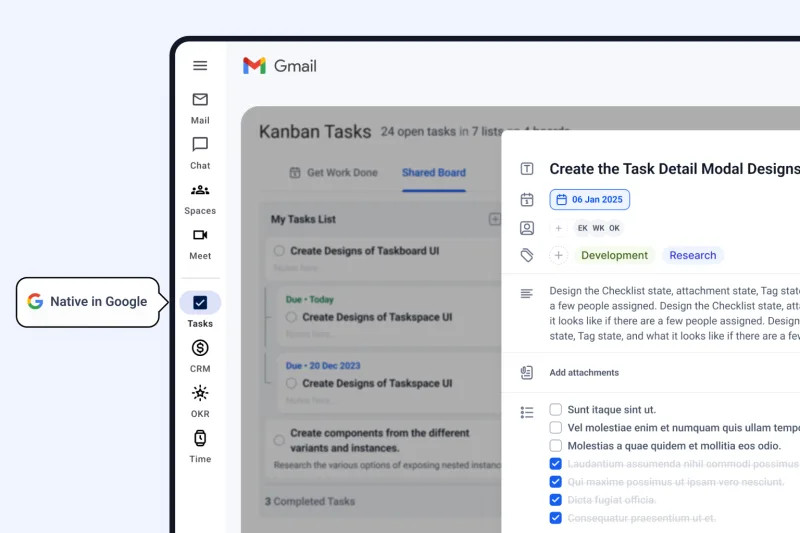
Manage your projects, clients, and deadlines from inside Gmail and Google Workspace. Kanban Tasks and Sales CRM give independent professionals a lightweight project management and CRM system that feels completely native in the tools you already use every day.
Start using it right away, no credit card required.

Most freelancers already live in Gmail. Emails become action items, project updates land in your inbox, and client requests pile up alongside everything else. Kanban Tasks turns that inbox chaos into a structured, visual workflow without asking you to open another app or learn another tool.
It is a real-time project management dashboard that sits natively inside Gmail and Google Workspace, giving you a shared, visual view of every task, deadline, and project at a glance. Kanban Tasks keeps your work visible and priorities clear, ensuring you have a single, unified view of all your commitments.
What Kanban Tasks gives you
2026-04-07 Latest update: Uploads are easier to preview, retry, and manage
Kanban Tasks seamlessly integrates into your existing Google Workspace workflow. There is no migration required, no setup overhead, and no learning curve.
Add Kanban Tasks to Chrome in under a minute. It appears directly inside Gmail and Google Workspace. You don’t have to log into any new apps or open new tabs.
Create and customize your Kanban board your way. Add custom columns, fields, and tags. You can do it manually, import Google Tasks, or let AI organize everything from your emails and meetings.
Your boards, your due dates, and your team activity all appear inside Gmail. Drag tasks across stages, track your progress, and stay on top of every project without switching to a separate project management tool.
Tooling Studio connects with AI tools and agents through Model Context Protocol (MCP) integration, giving you the ability to bring intelligent automation directly into your Google Workspace workflow.
Freelancers and small teams who juggle multiple clients and projects can now achieve the productivity leverage that was once only available with a dedicated, full operations team.
What MCP integration means for your work
Tooling Studio is MCP-ready, which means your Kanban boards become a live data layer that AI agents can read, act on, and update. For independent professionals who want to work smarter without hiring help, this is the productivity infrastructure that makes it possible.
Start using it right away, no credit card required.
Freelancers and independent professionals face a different set of challenges than office teams. You are your own project manager, account manager, and delivery lead simultaneously.
We were freelancers once too, and we know the best productivity tools for professionals are the ones that disappear into your workflow and let you focus on the work itself.
When every client sends work through email, it is easy for important requests to get buried. Kanban Tasks gives every project its own visual pipeline so you can see exactly where each piece of work stands, what is coming up, and what needs your attention today.
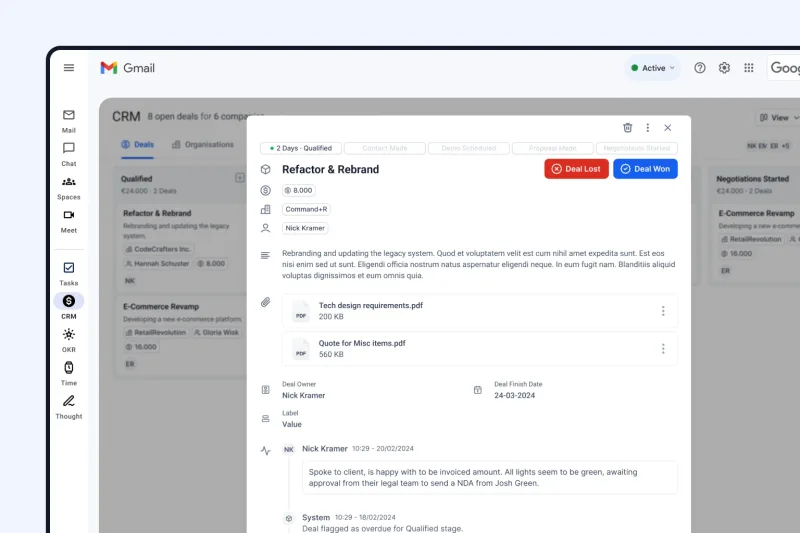
Sales CRM lets you manage your contacts, client organizations, and active opportunities from inside Gmail. Add notes after every call, track follow-up dates, and keep the full history of each client relationship in one place without needing a separate application.
The dedicated Today and This Week views in Kanban Tasks act as a built-in project progress tracker, surfacing the tasks that need your attention right now. You get a clear, honest picture of your workload every morning without having to dig through a list of everything that is theoretically in flight.
Shared boards let you bring clients or contractors into your workflow on a project-by-project basis. They can see what you are working on, leave comments, and track delivery without needing access to your entire Google Workspace environment.
Most project management tools are built for teams of twenty-five. They come with features you will never use, dashboards that require a manual to understand, and onboarding processes that eat an entire afternoon. Kanban Tasks and Sales CRM are built for one-to-five person operations that want just enough structure to stay organized.
Freelancers often stop using project management software because it requires leaving their primary workspace: Gmail.
Your inbox is the hub for your entire workday. Constantly shifting to a separate tab for a parallel system creates significant friction, leading to hours of lost time each week due to context switching.
Tooling Studio products are natively embedded directly in your Google Workspace. They do not ask you to migrate your data, replace your existing tools, or change the way you work. Kanban Tasks and Sales CRM slot into Gmail the way a sidebar should: useful when you need them, invisible when you do not.
Everything stays in the Google ecosystem you already trust
Google Workspace teams use Tooling Studio to keep work visible without adding more tab switching.
Answers to the most common questions from freelancers and independent professionals.
Kanban Tasks and Sales CRM are free to get started. Install the Chrome extension, open Gmail, and your first board is ready in under a minute.
Start using it right away, no credit card required.