Discover the 12 best project management google apps to streamline workflows. Our guide covers native tools and integrations to boost productivity in Workspace.

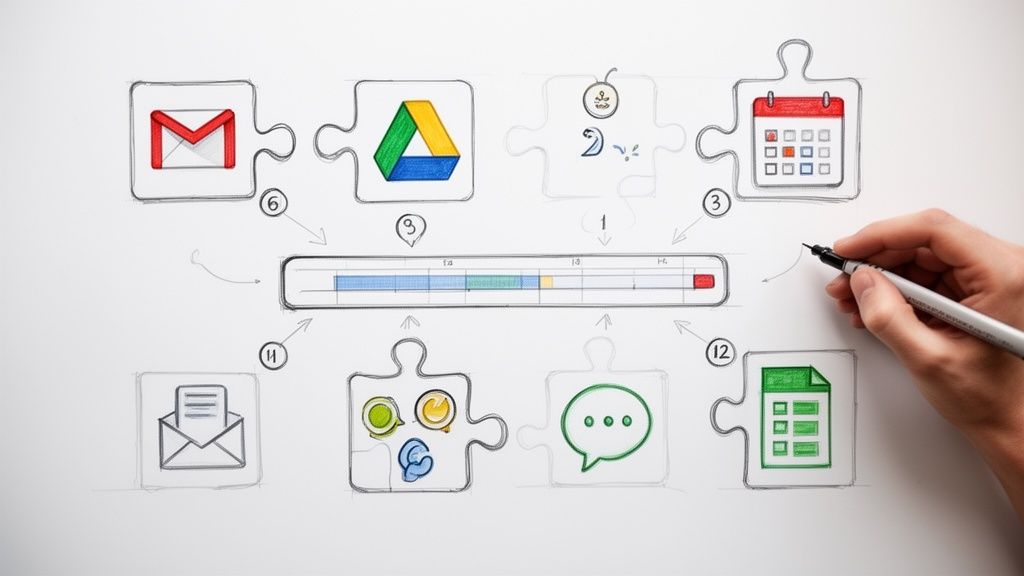
The average project manager loses significant time each day to context switching. Jumping between your project management software and your Google Workspace apps like Gmail, Calendar, and Drive fragments focus, creates data silos, and introduces friction into your team's workflow. For teams that practically live inside Google’s ecosystem, this constant toggling is a major productivity drain. What if your inbox wasn't just for messages, but the command center for your entire project?
This guide is the solution. We’ve curated a definitive list of the best project management Google apps and extensions that transform Google Workspace into a centralized, powerful hub for end-to-end project execution. Forget surface-level integrations; we're focusing on deep, native tools that allow you to manage tasks, track progress, and collaborate on deliverables without ever leaving your familiar Google interface. While the broader market offers a vast array of options, and it's useful to understand the landscape by exploring comparisons of the best project management tools, this article is specifically for teams committed to maximizing their Google Workspace investment.
Here, you will find a detailed breakdown of each tool, complete with screenshots, direct links, practical use cases, and an honest assessment of its limitations. Our goal is to help you find the right fit for your team's size, workflow complexity, and budget, enabling you to finally consolidate your work where it happens.
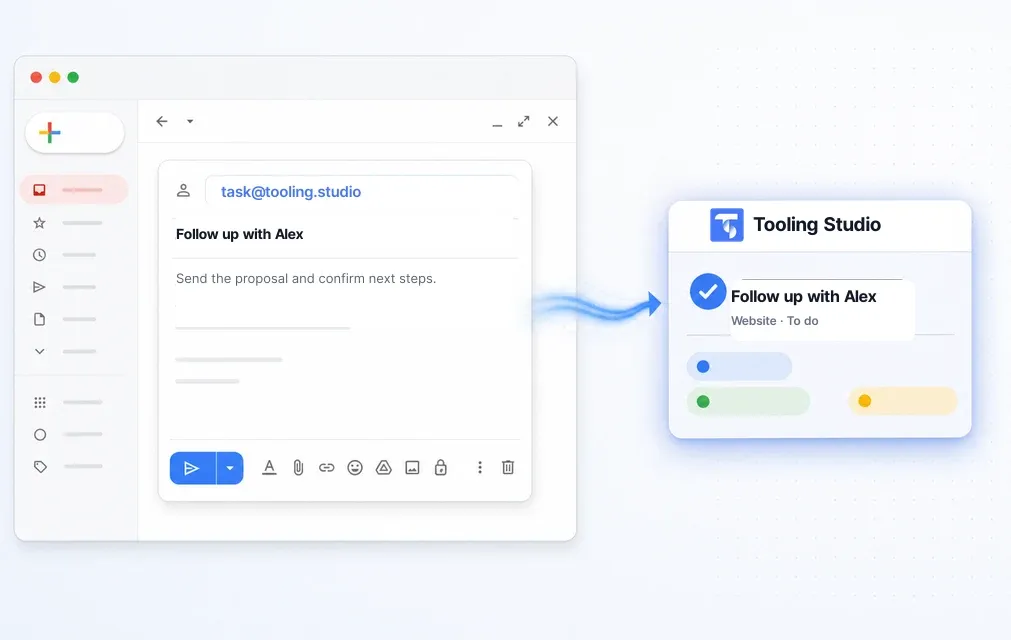
Tooling Studio stands out as an exceptional choice for teams deeply embedded in the Google Workspace ecosystem. It offers a suite of lightweight Chrome extensions designed to bring powerful project and sales management capabilities directly into your most-used Google apps, effectively eliminating the need for constant context switching. Its core strength lies in its ability to overlay a visual, intuitive Kanban board system on top of Gmail and Google Tasks, transforming your inbox from a source of chaos into a structured command center for your projects.
This approach to project management with Google apps feels incredibly natural. You can drag and drop emails to instantly create tasks, assign them to team members, set due dates, and visualize your entire workflow without ever leaving Gmail. This tight, near-native integration makes adoption seamless for teams already familiar with Google’s interface, significantly reducing the learning curve and boosting productivity from day one.
Tooling Studio’s feature set is intentionally focused on enhancing, not replacing, Google's native functionality.
Gmail-Integrated Kanban Boards: The flagship feature allows users to create and share visual task boards inside Gmail. A practical use case involves a customer support team turning incoming support emails into trackable tickets on a shared board, moving them from "New" to "In Progress" to "Resolved" in real time.
Drag-and-Drop Task Creation: Simply drag any email onto your Kanban board to convert it into an actionable task. This is ideal for project managers who receive action items via email and need a low-friction way to delegate them to their team.
Integrated Sales CRM (Beta): Manage contacts, sales pipelines, and deals directly within Google Contacts. This is perfect for small sales teams that want a simple CRM without the complexity and cost of a standalone platform.
Real-Time Collaboration: Shared boards and task assignments update instantly for all team members, ensuring everyone is aligned on priorities and progress.
Tooling Studio maintains a simple and accessible pricing model, making it a strong contender for both individuals and teams.
| Plan | Price | Key Features |
|---|---|---|
| Personal | Free Forever | Full access for individual use (no CC needed) |
| Team Plan | $5/user/month | Team sharing, collaboration, and priority support |
| Annual Plan | $50/user/year | Includes a ≈16% discount over monthly billing |
You can start for free by installing the extension from the Chrome Web Store and upgrade only when you need to collaborate with your team. A 30-day money-back guarantee provides a risk-free trial for team features. For those interested in a deeper dive, Tooling Studio provides further insights on their blog. You can learn more about their approach to project management in Google apps.
Pros:
Native Google Integration: Keeps workflows inside Gmail and Google Tasks, drastically reducing app-switching.
User-Friendly: The near-native UI and drag-and-drop functionality make it incredibly intuitive.
Affordable and Transparent Pricing: A generous free-forever plan and simple team pricing make it accessible.
Strong Social Proof: Boasts over 1,000 users and a 4.6-star average rating from 40+ reviews.
Cons:
Platform Limitations: Currently available only as a Chrome extension, with a standalone mobile app planned for Q3 2025.
One-Way Sync: Data syncs from Google to Tooling Studio, but not yet the other way around.
Beta Features: The Sales CRM and other advanced tools are still in beta, which may limit some workflows.
The Google Workspace Marketplace is your primary, official hub for discovering and installing third-party project management Google apps that directly integrate with Workspace tools like Gmail, Drive, Docs, and Sheets. Instead of being a single tool, it’s a verified storefront where you can find hundreds of specialized add-ons to build your ideal project management environment.
Its key advantage is the centralized and secure deployment. Workspace administrators can vet, approve, and install applications for their entire organization, ensuring security compliance and seamless single sign-on (SSO) with existing Google accounts. Each listing provides transparency through user reviews, install counts, and a clear breakdown of the data permissions an app requires. This vetting process provides a level of trust you won't find elsewhere.
While the marketplace itself is free to browse and use, the individual apps listed will have their own pricing models, which often requires visiting the vendor’s website for details. A practical tip is to start by exploring the dedicated "Project Management" category and filter by user rating to surface the most trusted solutions first.
For teams already invested in a dedicated project management platform, Asana’s hub for Google integrations offers one of the most comprehensive connections available. Instead of being a standalone app, this is a suite of project management Google apps designed to embed Asana’s powerful work graphs directly into your daily Workspace tools, from Gmail to Google Docs. It allows users to turn emails into trackable tasks, attach Drive files, and sync project deadlines with Google Calendar.

The key advantage is its enterprise-ready maturity and deep integration. Features like smart chips let you embed live-updating task statuses directly into a project brief in Google Docs, while the Gmail add-on provides robust controls for assigning tasks and setting due dates without leaving your inbox. Its admin guidance and support for SSO and SCIM make it a secure, scalable choice for organizations.
While a free Asana plan exists, many of the most valuable integrations and advanced features are gated behind paid tiers, which can be a significant investment. The platform’s complexity means onboarding new team members can be more involved than with simpler tools. A practical tip is to leverage the Gmail add-on first to see how it fits your workflow before committing the entire team to the full platform.
Trello excels at visual Kanban-style project management, and its dedicated Google integrations transform it into a powerful command center connected directly to your Workspace. Instead of being a siloed tool, Trello’s platform allows you to create and manage work that originates from your Google ecosystem, making it one of the most intuitive project management Google apps for teams who prioritize visual clarity and simplicity.

The key advantage is its direct-action integrations, like the Gmail add-on that converts emails into actionable cards with one click, capturing the subject and body automatically. You can also create and attach Google Drive files directly from a card, or even generate a Google Slides presentation from a Trello board's content. For teams already leveraging Trello, exploring various use cases can further optimize your Google Workspace integration. Check out these sample Trello boards for workflow management to see how you can structure different projects.
While Trello's core offering is free, accessing multiple Google integrations (like Drive and Gmail) simultaneously requires a paid plan, as they are managed through Trello's "Power-Ups" system. Its low learning curve makes it perfect for simple pipelines, but teams needing advanced Gantt charts or complex dependency management may find it limiting. A practical tip is to start with the Gmail Power-Up to centralize incoming tasks before expanding to other Google connections.
monday.com is a powerful Work Operating System (Work OS) that uses a highly visual, board-based approach to project management. Its strength lies in its incredible flexibility, allowing teams to build custom workflows for everything from agile sprints to complex marketing campaigns and CRM pipelines. Its integration with Google Workspace is a key reason it’s one of the most popular project management Google apps for teams seeking a centralized hub.

The platform’s official Google Workspace add-on enables direct connections with Gmail and Google Calendar. This allows users to convert emails into actionable tasks or sync project deadlines with their calendar without leaving their Google app. Combined with enterprise-grade SSO and a vast library of automation recipes and templates, monday.com scales effectively from small teams to large organizations needing portfolio-level oversight.
While monday.com offers a free plan, its more advanced features, integrations, and user seats are part of its paid tiers, which can become a significant investment as a team grows. A practical tip is to start with a specific project using a pre-built template to understand its core functionality before designing a complex custom workflow from scratch.
ClickUp is a powerful, all-in-one productivity platform designed to consolidate tasks, documents, goals, and chat into a single application. For teams embedded in the Google ecosystem, it offers a suite of integrations that make it one of the most versatile project management Google apps available. Its core strength lies in its deep feature set and extreme customizability, catering to teams that want to manage everything from simple to-do lists to complex, multi-stage projects without leaving one tool.

The platform supports native Google Single Sign-On (SSO) for easy access and allows users to link Gmail accounts to send and receive emails directly within a task, keeping all communication contextual. Its Chrome extension is particularly useful for quickly capturing tasks from any webpage, tracking time, and taking screenshots. While its extensive feature set offers immense power and flexibility, new users may experience a steep learning curve. The initial setup requires careful planning, especially for larger teams needing structured permissions and governance. For a deeper analysis, you can explore this overview of ClickUp as a top project management software solution.
ClickUp offers a competitive free-forever plan with generous limits, with paid plans starting at $7 per user/month that unlock advanced features and unlimited storage. A practical approach is to start with the free plan to master the core hierarchy and views before deciding if your team needs the advanced automations and reporting available in paid tiers.
Smartsheet offers a powerful, spreadsheet-like interface for managing complex projects and workflows, making it one of the most robust project management Google apps for teams accustomed to grid-based planning. Its tight integration with Google Workspace allows users to sign in with their Google credentials and add Smartsheet directly to the App Launcher for easy access. This creates a more cohesive experience, bridging the gap between a dedicated work management platform and core Google tools.

The key advantage lies in its deep connections with Drive, Gmail, and Calendar. You can attach Google Drive files directly to specific rows in your sheets, keeping all project assets contextual and accessible. The Gmail add-on lets you create or update Smartsheet rows from your inbox, while Calendar synchronization ensures project deadlines and milestones are reflected across both platforms. This level of integration makes it ideal for teams that need advanced reporting, resource management, and portfolio-level views without leaving the Google ecosystem entirely.
While the core platform is a paid service with multiple tiers, the Google Workspace integrations themselves are included with a Smartsheet subscription. A practical approach is to leverage the familiar spreadsheet user experience to reduce training time for your team, focusing on the powerful Gantt chart and automation features that go far beyond what a standard Google Sheet can offer.
For teams whose workflows are heavily driven by email communication, Wrike’s integration offers one of the most robust solutions. This project management Google app functions as an add-on for Gmail and Google Workspace, allowing users to transform emails directly into structured tasks within the Wrike platform without ever leaving their inbox. This creates a powerful bridge between reactive communication and proactive project planning.

Its core strength lies in its two-way synchronization. You can create, view, and edit Wrike tasks from a sidebar in Gmail, attach emails as comments to provide context, and sync attachments seamlessly. This functionality is ideal for client-facing teams, such as account management or support, who need to convert client requests into actionable items for internal teams instantly. It ensures crucial details from an email thread are not lost during manual data entry.
While the add-on itself is free, it requires an active Wrike subscription. The platform’s depth can also mean a steeper learning curve for new users, and some add-on features are limited to web or Android environments. For best results, use it to capture initial requests and then manage the complex project details within the main Wrike application.
For software development, IT, and engineering teams embedded in Google Workspace, the official Atlassian integration is an essential bridge. It connects the robust issue-tracking power of Jira and the collaborative knowledge base of Confluence directly into Google’s suite. This addon is less of a standalone app and more of a powerful connector that surfaces critical project information where teams are already working, such as in Gmail, Docs, and Sheets.

Its core strength lies in reducing context switching. Users can create new Jira issues or add comments to existing ones directly from a Gmail thread, converting an email into a trackable task without leaving their inbox. While Atlassian’s ecosystem is a leader in technical project management Google apps, non-technical teams might find the Jira-centric terminology and setup somewhat complex. The integration’s best features are also optimized for Jira Cloud users, with some limitations for those on Server or Data Center instances.
The addon itself is free to install from the Workspace Marketplace, but it requires an active subscription to the corresponding Atlassian products (Jira and/or Confluence). A practical tip is to use the “Smart Chips” feature in Google Docs to embed and preview live Jira issues, providing real-time status updates within project plans or meeting notes.
Zoho Projects is a comprehensive project management platform that extends its powerful features directly into the Google ecosystem. It stands out by offering a full suite of project management Google apps that are more than just simple integrations; they are functional extensions for tools like Gmail and Google Docs. This makes it an excellent choice for teams, especially small to medium-sized businesses, who need robust project management capabilities without leaving their familiar Google environment.

The key advantage is its deep integration and value. The Gmail add-on allows you to convert emails into tasks or issues instantly, while smart chips in Google Docs let you embed and link to active Zoho tasks, creating a seamless workflow between communication and execution. While the user interface can feel dense and may require some initial setup to tailor it to your needs, its competitive pricing, which includes built-in time tracking and resource management tools, offers exceptional functionality for the cost.
Zoho Projects has its own pricing plans (including a free tier), but the Google Workspace add-ons are available to install from the Marketplace. For effective use, focus on setting up project templates within Zoho first, which will streamline the process of creating tasks from Gmail and Docs later on. The integration polish can vary, so test key workflows like task creation and calendar sync thoroughly.
Teamwork.com for Gmail is one of the most powerful project management Google apps for agencies, consultants, and service-based businesses that live in their inbox. Its primary function is to bridge the gap between client communication and project execution by allowing users to instantly convert emails into actionable tasks within the Teamwork.com platform, all without leaving the Gmail interface. This direct link prevents crucial client requests from getting lost in overflowing inboxes.

What sets Teamwork.com apart is its deep focus on client work profitability. The platform includes built-in time tracking, invoicing, and resource management features that are essential for billing clients accurately and managing team utilization. It also integrates with Google Drive and Calendar, allowing you to attach project files and sync deadlines effortlessly. This makes it an end-to-end solution for managing the entire client project lifecycle, from initial request to final invoice.
While the Gmail add-on is free, it requires a paid Teamwork.com subscription to unlock its full potential, with advanced features like budgeting and portfolio views reserved for higher-tier plans. To use it effectively, connect the add-on and start identifying actionable client emails. Use the task creation window to assign the task, set a due date, and log time directly from that email thread.
Kanbanchi is a purpose-built project management app designed to feel like a native part of Google Workspace. Its defining feature is that all your project boards, tasks, and related data are created and stored directly within your Google Drive. This approach leverages Google's existing infrastructure for sharing, permissions, and security, creating a familiar and deeply integrated user experience for managing projects.

The platform’s tight alignment with the Google ecosystem is its key advantage. Users sign in with their Google account, and deployment can be managed centrally by a Workspace administrator. It combines visual Kanban boards with Gantt charts, time tracking, and team dashboards, offering a versatile toolset that caters to various project methodologies. The ability to attach files from Drive, sync deadlines with Google Calendar, and even create tasks from Google Forms makes it one of the more seamless project management Google apps available. For those looking for a comprehensive guide on visual project management, you can explore Kanban boards for Google here.
While its integration is top-notch, its ecosystem is smaller than standalone giants like Asana or Trello. This means fewer third-party integrations outside of the Google sphere, and it may lack advanced portfolio management or governance features required by large enterprises. Kanbanchi offers a free tier for individual use, with paid plans for teams unlocking advanced features.
| Product | Core features | UX & Rating | Pricing & Value | Best for (👥) | Unique selling points (✨) |
|---|---|---|---|---|---|
| 🏆 Tooling Studio | In‑Gmail Kanban, drag‑drop, email→task, shared boards, Sales CRM (beta) | ★4.6 (40+ reviews), near‑native UI, real‑time collaboration | 💰 Free personal; $5/user/mo or $50/user/yr; 30‑day money‑back | 👥 Individuals, small teams, Google Workspace users | ✨ Native Gmail integration, low‑friction Kanban + CRM, Chrome extension |
| Google Workspace Marketplace | Centralized app discovery, admin deploy, permissions & listings | Varies by app, store reviews available | 💰 Vendor-dependent (free & paid apps) | 👥 Admins, IT, app discoverers | ✨ Official directory, domain install, permission transparency |
| Asana for Google Workspace | Gmail add-on, smart chips, Calendar & Drive sync, Chat app | ★4.4, mature enterprise UX | 💰 Freemium; premium tiers unlock advanced features | 👥 Mid-size → enterprise teams, PMs | ✨ SSO/SCIM, rich templates & automation |
| Trello + Google | Kanban boards, Gmail add-on, Drive attachments, Slides export | ★4.5, very simple & visual | 💰 Freemium; Power‑Ups paid | 👥 Small teams, visual Kanban users | ✨ Low learning curve, extensible Power‑Ups |
| monday.com | Gmail & Calendar connectors, automations, templates | ★4.3, highly customizable work OS | 💰 Paid tiers; pricing scales with seats/apps | 👥 Teams needing custom workflows, enterprises | ✨ Powerful automations, broad template library |
| ClickUp | Google SSO, Gmail linking, Chat bot, Chrome extension | ★4.5, feature‑rich but dense | 💰 Strong free plan; paid for advanced features | 👥 Teams wanting all‑in‑one PM + docs + goals | ✨ All‑in‑one suite: tasks, docs, goals, time tracking |
| Smartsheet for Google Workspace | Sheet/Gantt views, Gmail add‑on, Drive attachments | ★4.1, spreadsheet‑first UX | 💰 Paid; enterprise reporting and portfolio features | 👥 PMs who prefer spreadsheets, portfolios | ✨ Grid + Gantt + resource & reporting capabilities |
| Wrike for Gmail & Workspace | Create/update tasks from Gmail, two‑way sync, attachments | ★4.0, powerful for portfolios | 💰 Paid tiers; enterprise features | 👥 Cross‑functional teams, email‑driven workflows | ✨ Two‑way email sync, robust portfolio tools |
| Atlassian (Jira + Confluence) | Create/update Jira from Gmail, Docs context, admin controls | ★4.2, engineering/IT focused | 💰 Paid per product; enterprise plans | 👥 Engineering & IT teams | ✨ Enterprise issue tracking, mature ecosystem |
| Zoho Projects | Gmail add‑on, Docs smart chips, Calendar & Drive integration | ★4.0, value‑oriented | 💰 Affordable SMB plans | 👥 SMBs, budget-conscious teams | ✨ Built‑in time tracking, competitive pricing |
| Teamwork.com for Gmail | Convert emails to tasks, time tracking, reporting, billing | ★4.1, client/project focused | 💰 Paid tiers; agency features | 👥 Agencies, services teams, client work | ✨ Billing/utilization features, client‑centric workflows |
| Kanbanchi: Project & Task Management | Drive‑stored boards, Kanban + Gantt, Gmail & Calendar integration | ★4.1, Google‑native UX | 💰 Paid plans; Drive‑based storage model | 👥 Google Workspace teams wanting Drive‑native boards | ✨ Boards live in Google Drive, tight sharing model |
Navigating the ecosystem of project management Google apps can feel overwhelming, but the right choice ultimately hinges on your team's specific workflow, scale, and technical needs. Throughout this guide, we've explored a wide spectrum of solutions, from lightweight Gmail extensions to robust enterprise platforms, all designed to centralize your work within the familiar Google Workspace environment. The core takeaway is clear: you no longer need to jump between disparate systems to manage projects. By integrating your tools directly into Gmail, Drive, and Calendar, you can reclaim focus, reduce context-switching, and create a truly unified command center for your team.
The primary benefit of this integrated approach is the drastic reduction in "app fatigue." Instead of treating your inbox as just a communication tool and your project platform as a separate entity, these apps merge them into a single, cohesive workflow. This synergy transforms reactive email management into proactive project execution.
Choosing the perfect tool requires an honest assessment of your team’s daily operations. To simplify your decision-making process, consider these common project management scenarios:
For Individual Productivity & Lightweight Team Coordination: If your goal is to manage tasks directly from your inbox without a complex setup, a native Gmail extension is your best starting point.
For Scaling Teams & Cross-Functional Collaboration: When your projects involve multiple departments and require advanced features like Gantt charts, resource management, and detailed reporting, a dedicated project management platform with deep Google Workspace integration is essential.
For Enterprise-Level & Specialized Workflows: Large organizations or teams with specific methodologies (like Agile software development or complex portfolio management) need powerful, purpose-built tools.
Ultimately, the best project management google apps are the ones that fade into the background, allowing your team to focus on the work itself, not the administration of it. Before committing to a large-scale platform, consider piloting a lightweight, native extension. This allows you to experience the immediate benefits of an integrated workflow and build momentum for a wider adoption.
Ready to transform your Gmail into a powerful, organized project hub? Get started in seconds with a tool built for simplicity and efficiency. Explore Tooling Studio to create Kanban boards, manage tasks, and collaborate with your team without ever leaving your inbox.