Education
Reviewer ProfileReviewer ProfileReviewer ProfileReviewer ProfileReviewer Profile
4.6
from 40+ reviews

Project Management for Schools that Just Works

Visualize projects in your school, collaborate with colleagues, and keep students on track directly inside Google Workspace. Simple enough for the classroom, powerful enough for administration.

  • Familiar Google Interface
  • Collaborate on Projects & Curriculums
  • Seamless Google Workspace Integration

Trusted by schools and universities worldwide!

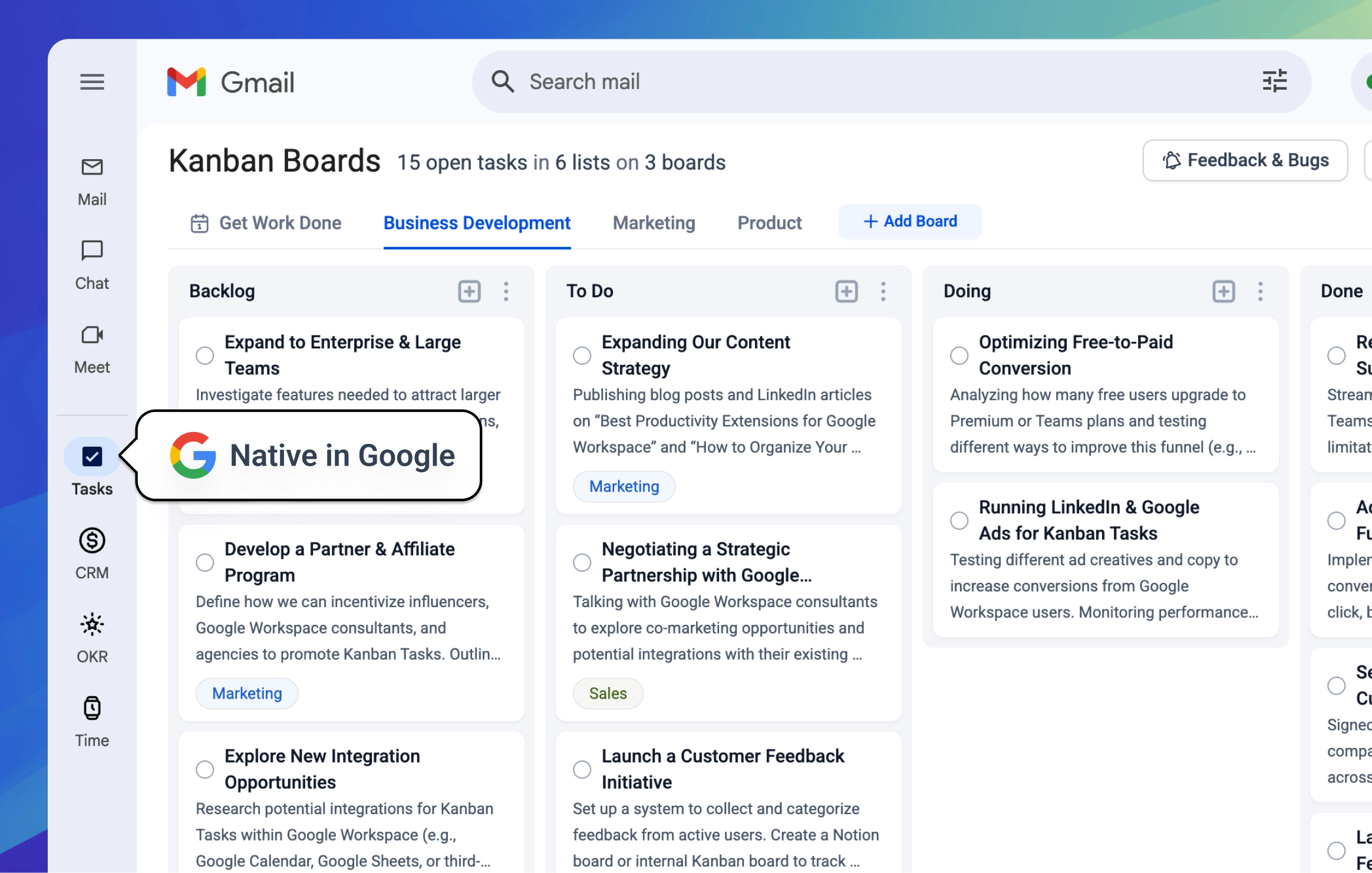
Natively embedded directly in your Google Workspace.
See the full walkthrough here.

Company LogoCompany LogoCompany LogoCompany LogoCompany LogoCompany LogoCompany Logo
Companies of all sizes trust Tooling Studio and Kanban Tasks for their productivity.

Embedded in Your School's Workspace

Effortlessly manage tasks directly within Google Workspace. Turn emails from parents or colleagues into tasks with one click and stay in the flow.

Intuitive Kanban Boards

Visual Project Boards

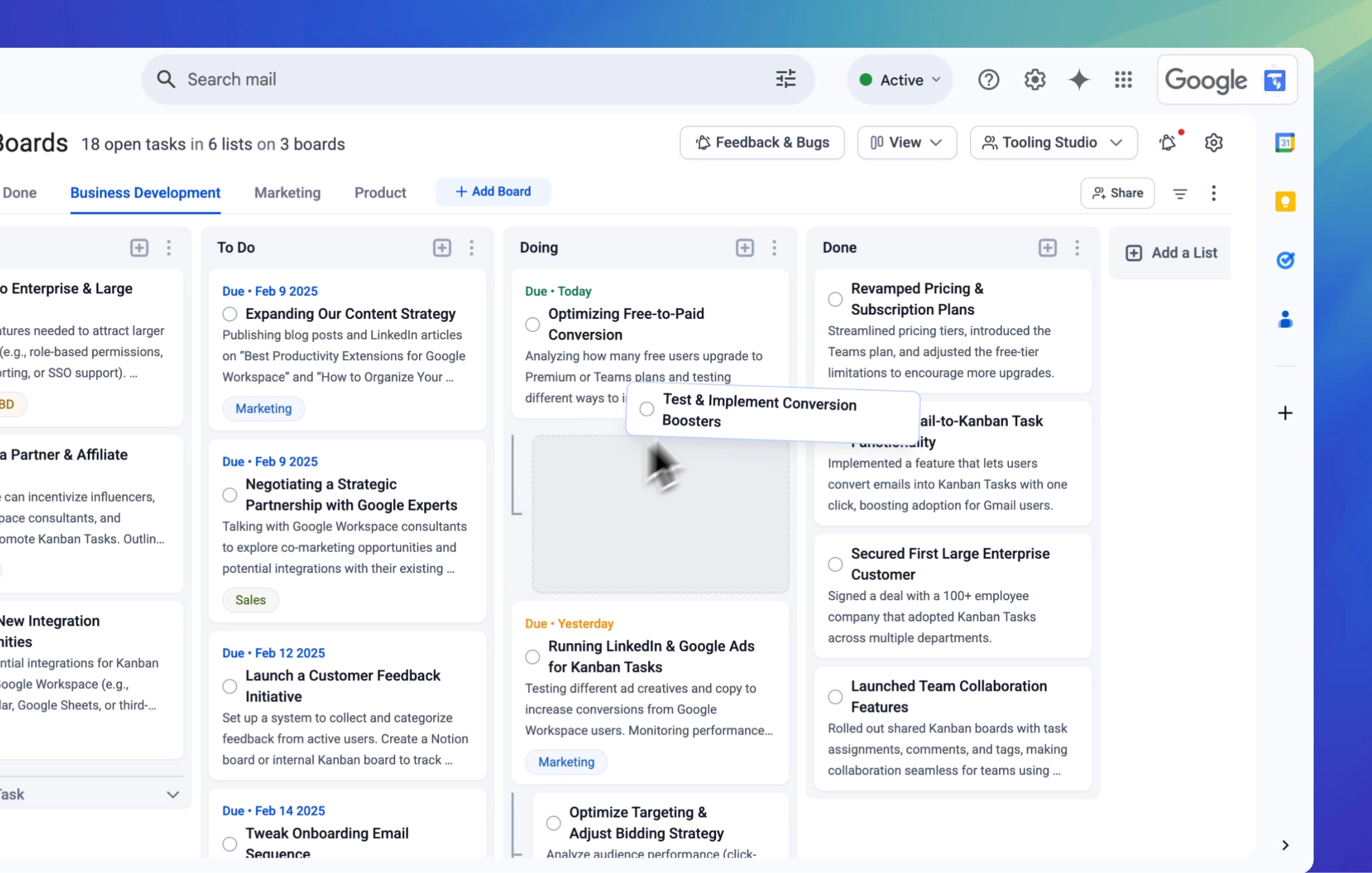
Visualize projects, curriculum planning, or event organization. Drag and drop to update status—simple enough for anyone to use without training.

Seamless Workspace Sync

Stay Organized & Focused

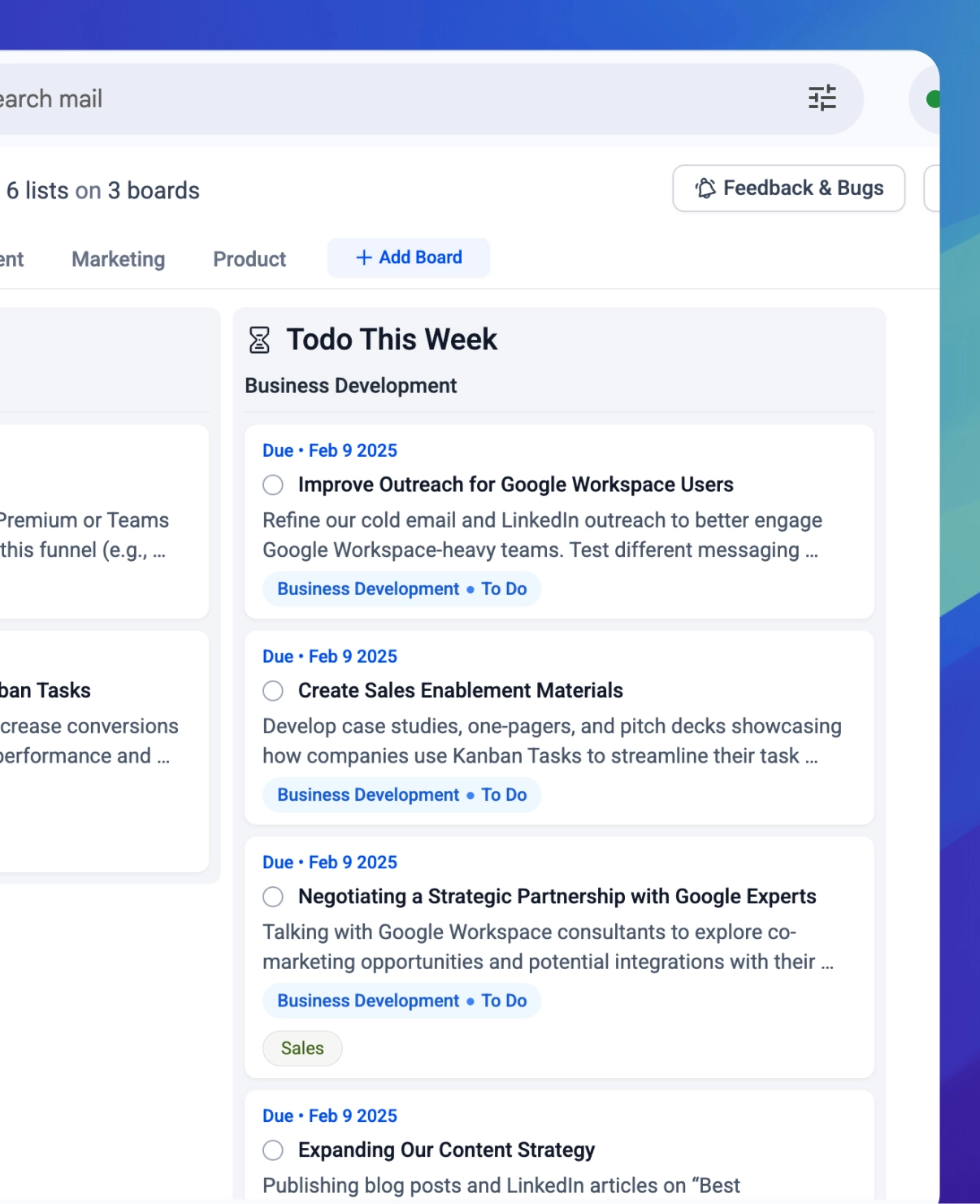
We collect all tasks with a due date for 'Today' and 'This Week' automatically. Perfect for teachers and staff juggling multiple classes and deadlines.

Smart Task Automation

Teacher & Staff Collaboration

Work together on shared boards. Coordinate with your department, plan school events, or manage administrative tasks together.

Team Collaboration

Flexible for Any Context

From simple to-do lists to complex project workflows. Use checklists for grading steps, tags for subjects, and custom labels.

Team Collaboration

Rich Task Details

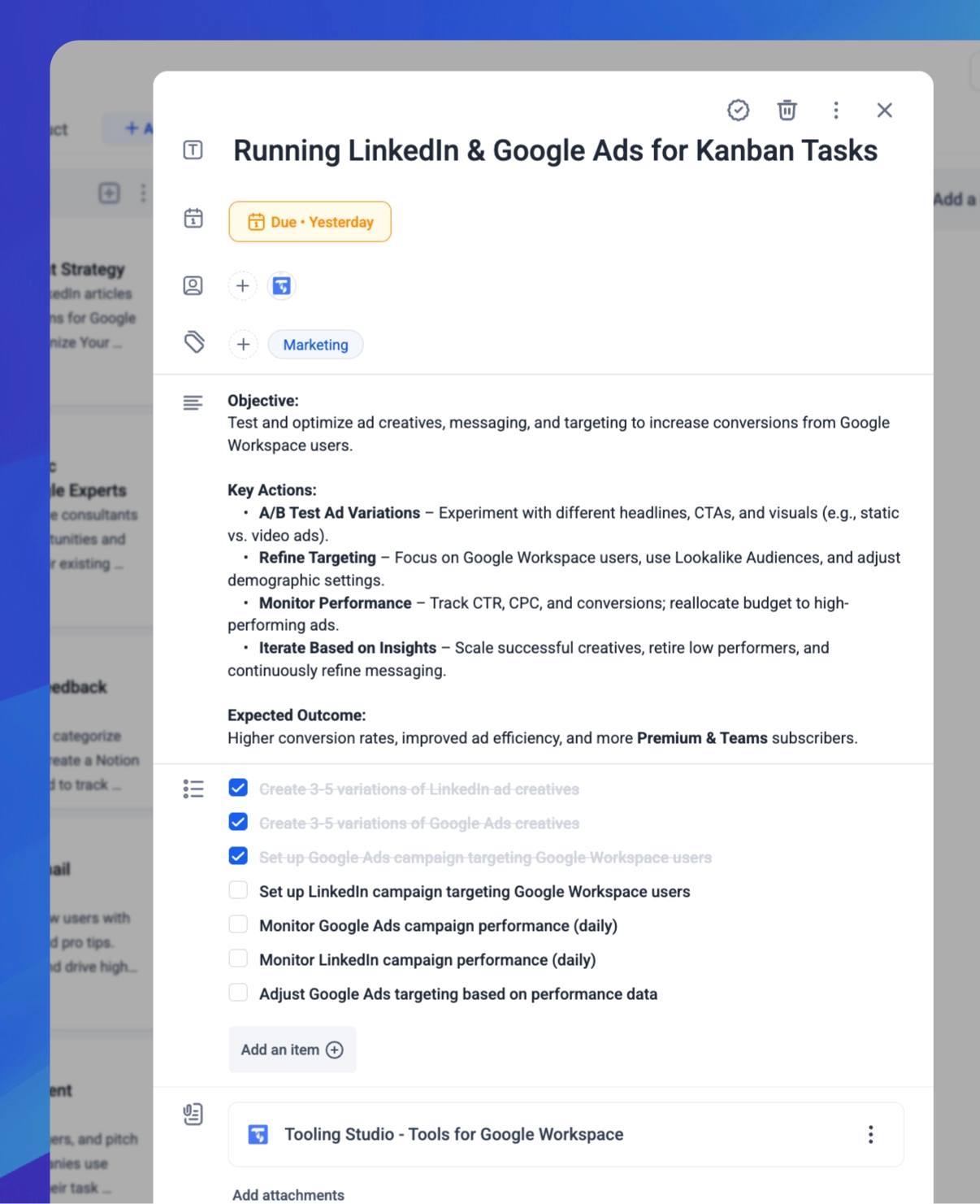
Attach lesson plans, add comments for feedback, and assign tasks to colleagues. Keep all context in one place.

Robust Admin Controls
Kanban Tasks Features

Kanban Tasks Features for Google Workspace

Kanban Tasks makes task management inside Google Workspace easier with a visual, flexible shared kanban board. Organize tasks, automate due dates, collaborate with teams, and manage priorities without leaving Gmail, Meet or Calendar. Explore the key features that help teams stay productive, streamline workflows, and keep track of every task in one place.

Overview & Walkthrough

Overview & Walkthrough

This is a walkthrough of Kanban Tasks, a Chrome extension by Tooling Studio that seamlessly integrates with Google Workspace. You'll see how to create and manage Kanban boards directly within Gmail, organize tasks with lists and tags, collaborate in real-time, track changes with an activity log, and convert emails into tasks with a simple drag-and-drop. The demo covers key features that help streamline workflow, enhance productivity, and improve team collaboration—all within your existing Google Workspace setup. Watch the video to see it in action, then try it out for yourself and share your feedback with Eric and the team

Get Work Done
Get Work Done

Get Work Done

Effortlessly stay on top of your priorities with automated lists like ‘Due Today’ and ‘Due This Week’ on your Get Work Done board. These lists collect tasks with due dates from all your boards, giving you and your team a clear overview of what needs attention, so you can stay focused and productive without missing deadlines.

Tasks from Email
Tasks from Email

Tasks from Email

Convert your emails into actionable tasks with just one click. Integrate Gmail seamlessly and never lose track of important messages.

Drag & Drop
Drag & Drop

Drag & Drop

Prioritize and organize your tasks intuitively. Our drag-and-drop functionality makes reordering tasks a breeze.

Checklists
Checklists

Checklists

Break down tasks into manageable steps with detailed checklists. Stay organized and ensure nothing slips through the cracks.

Team Collaboration
Team Collaboration

Team Collaboration

Collaborate with your team using shared boards and real-time updates. Assign tasks, leave comments, and boost overall productivity.

Notifications
Notifications

Notifications

Never miss an update with instant notifications. Stay informed about task changes, assignments, and comments in real time.

Attachments
Attachments

Attachments

Enrich your task cards by adding relevant files, images, or documents. Keep all your resources at your fingertips.

Comments
Comments

Comments

Improve team communication with detailed task comments. Discuss ideas, provide feedback, and stay connected on every project.

Activity Log
Activity Log

Activity Log

Track every update with a comprehensive activity log. Monitor changes, task histories, and team progress all in one place.

Tags
Tags

Tags

Organize your tasks with customizable tags. Filter, label, and sort your workflow for optimal efficiency.

Assigning Tasks
Assigning Tasks

Assigning Tasks

Delegate work effortlessly by assigning tasks to team members. Enhance accountability and streamline project management.

Simple, transparent pricing

Our free plan delivers everything individual or personal users would need. For teams, our simple $5/month teams subscription offers seamless board sharing.

Features
Personal
$0
per month
All the essentials for solo users – completely free
Teams
$5
per user
per month
Unlock every feature and share your workflow with your team
Organize Your Projects
Unlimited Boards
Create a separate board for every project or workflow
Unlimited Lists per Board
Organize your board with as many columns as you need
Unlimited Tasks
No limits on the number of tasks you can create
Get Work Done Board
A central hub that displays all your tasks at a glance
Enhance Your Workflow
Due Dates & Reminders
Set deadlines and receive automatic alerts
One-Click Email to Task
Easily convert emails into tasks while keeping email links
Quick Date Adjustments
Update task deadlines effortlessly with drag-and-drop
Google Workspace Integration
Works seamlessly with Gmail, Calendar, and other Google tools
Subtasks
Break complex tasks into smaller, actionable steps
Rich Text Descriptions
Format your task details easily with markdown support
Custom Tags
Label and filter tasks with personalized tags
Attachments
Add files and documents directly to your tasks
Checklists
Include multiple to-do items within each task
Collaborate Effectively
Shared Boards
Collaborate in real time by sharing boards with your team
-
Assigning Tasks
Delegate tasks to team members and track progress effortlessly
-
Personal
$0 /month
All the essentials for solo users – completely free

Organize Your Projects

Unlimited Boards
Create a separate board for every project or workflow
Unlimited Lists per Board
Organize your board with as many columns as you need
Unlimited Tasks
No limits on the number of tasks you can create
Get Work Done Board
A central hub that displays all your tasks at a glance

Enhance Your Workflow

Due Dates & Reminders
Set deadlines and receive automatic alerts
One-Click Email to Task
Easily convert emails into tasks while keeping email links
Quick Date Adjustments
Update task deadlines effortlessly with drag-and-drop
Google Workspace Integration
Works seamlessly with Gmail, Calendar, and other Google tools
Subtasks
Break complex tasks into smaller, actionable steps
Rich Text Descriptions
Format your task details easily with markdown support
Custom Tags
Label and filter tasks with personalized tags
Attachments
Add files and documents directly to your tasks
Checklists
Include multiple to-do items within each task

Collaborate Effectively

-
Shared Boards
Collaborate in real time by sharing boards with your team
-
Assigning Tasks
Delegate tasks to team members and track progress effortlessly
Teams
$5 /user/month
Unlock every feature and share your workflow with your team

Organize Your Projects

Unlimited Boards
Create a separate board for every project or workflow
Unlimited Lists per Board
Organize your board with as many columns as you need
Unlimited Tasks
No limits on the number of tasks you can create
Get Work Done Board
A central hub that displays all your tasks at a glance

Enhance Your Workflow

Due Dates & Reminders
Set deadlines and receive automatic alerts
One-Click Email to Task
Easily convert emails into tasks while keeping email links
Quick Date Adjustments
Update task deadlines effortlessly with drag-and-drop
Google Workspace Integration
Works seamlessly with Gmail, Calendar, and other Google tools
Subtasks
Break complex tasks into smaller, actionable steps
Rich Text Descriptions
Format your task details easily with markdown support
Custom Tags
Label and filter tasks with personalized tags
Attachments
Add files and documents directly to your tasks
Checklists
Include multiple to-do items within each task

Collaborate Effectively

Shared Boards
Collaborate in real time by sharing boards with your team
Assigning Tasks
Delegate tasks to team members and track progress effortlessly

Frequently asked questions

Find answers to common questions about using Kanban Tasks in schools.

Explore related FAQs:

Kanban Tasks
Shared Kanban Boards with your Team
Start using Kanban Tasks for free. No credit card required. Just sign up with your Google Account and start managing your tasks in a Kanban Board directly in your Google Workspace.