
Examples of Kanban: 10 Real-World Boards for 2026
Explore 10 real-world examples of Kanban boards for sales, marketing, and development. Learn to build them in Google Workspace.
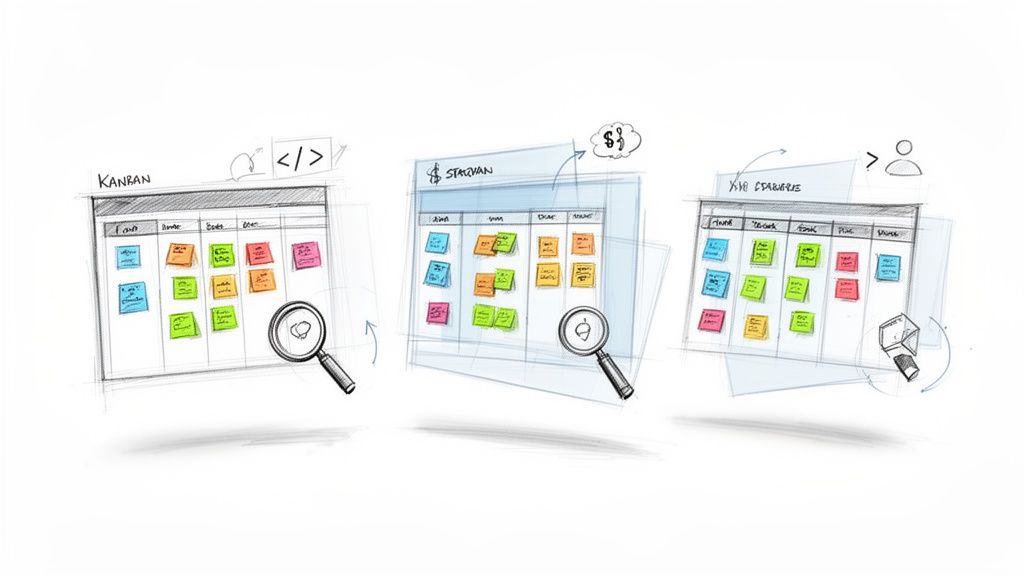
Is your team drowning in email threads, missed deadlines, and unclear priorities? The problem often isn't a lack of effort; it's a lack of visibility. Kanban, a simple yet powerful visual management system, transforms chaotic workflows into streamlined processes. It replaces abstract task lists with a clear, shared view of what needs to be done, what's in progress, and what's complete. This is far more than just a digital to-do list; it's a strategic framework for managing flow and improving efficiency.
This guide moves beyond theory to explore 10 practical examples of Kanban boards used by successful teams across various industries, from software development to HR and marketing. We'll dissect the strategic thinking behind each board's design, highlighting specific columns, swimlanes, and card details that drive results. More importantly, we provide actionable takeaways for each example.
You will learn not only what makes these boards effective but also how to replicate and enhance them using Tooling Studio's Kanban Tasks extension. This lightweight tool brings powerful workflow visualization directly into your Google Workspace, turning your Gmail and Drive into a centralized project hub. Prepare to move past guesswork and start managing your projects with tangible clarity and confidence.
1. Software Development Sprint Kanban Board
The Software Development Sprint Kanban Board is a cornerstone for agile teams, providing a visual representation of the entire sprint lifecycle. This approach merges Kanban's focus on workflow visualization and continuous flow with Scrum's time-boxed sprints, creating a powerful hybrid system. Teams use columns like Backlog, In Progress, Code Review, Testing, and Done to track user stories, bugs, and features from conception to completion.
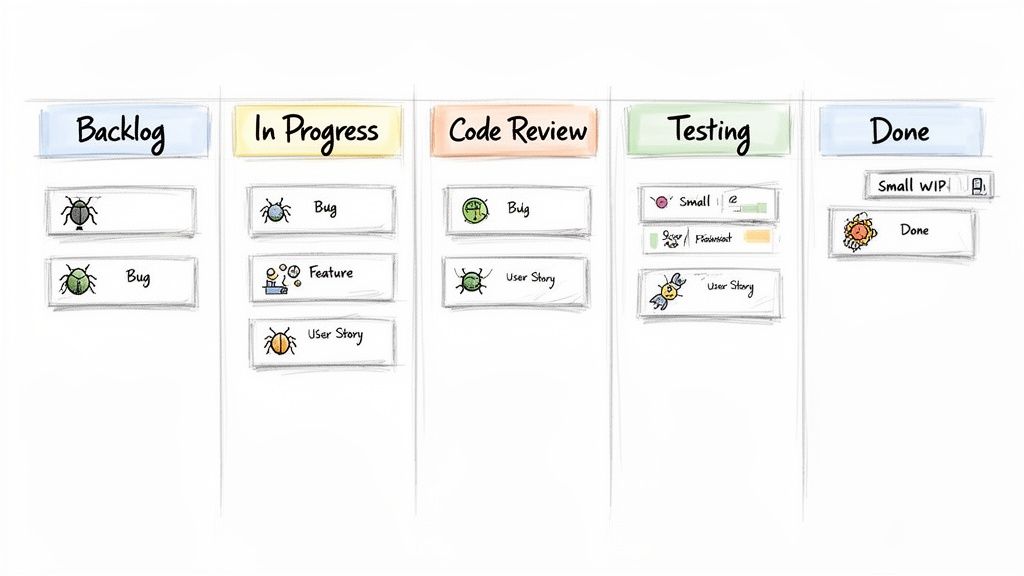
This method shines by enforcing Work In Progress (WIP) limits, which prevent developers from being overloaded and expose process bottlenecks early. For instance, if the Code Review column fills up, it's a clear signal that the team needs to pause new work and focus on reviewing existing code to keep the workflow moving smoothly.
Strategic Breakdown
Focus: Improve sprint velocity and predictability.
Best For: Agile software teams of any size, from startups to enterprise-level engineering departments.
Key Tactic: Use strict WIP limits (e.g., one or two active tasks per developer) to maintain a steady, manageable flow of work and reduce context-switching.
Actionable Takeaways
To effectively implement this type of Kanban board, teams should prioritize clear communication and process discipline. For teams utilizing a Software Development Sprint Kanban Board, incorporating effective Sprint Planning Best Practices can further enhance workflow and productivity. Additionally, using color-coded labels to distinguish between bugs, features, and technical debt helps in prioritizing tasks during daily stand-ups, making this one of the most effective examples of Kanban for technical teams.
2. Sales Pipeline and Lead Management Kanban
The Sales Pipeline and Lead Management Kanban transforms the abstract sales funnel into a dynamic, visual workflow. This approach allows sales teams to track prospects from initial contact to a closed deal, offering a clear view of the entire pipeline. Teams typically use columns like Lead, Qualified, Proposal, Negotiation, and Closed Won/Lost to manage deal progression and ensure no opportunity falls through the cracks.
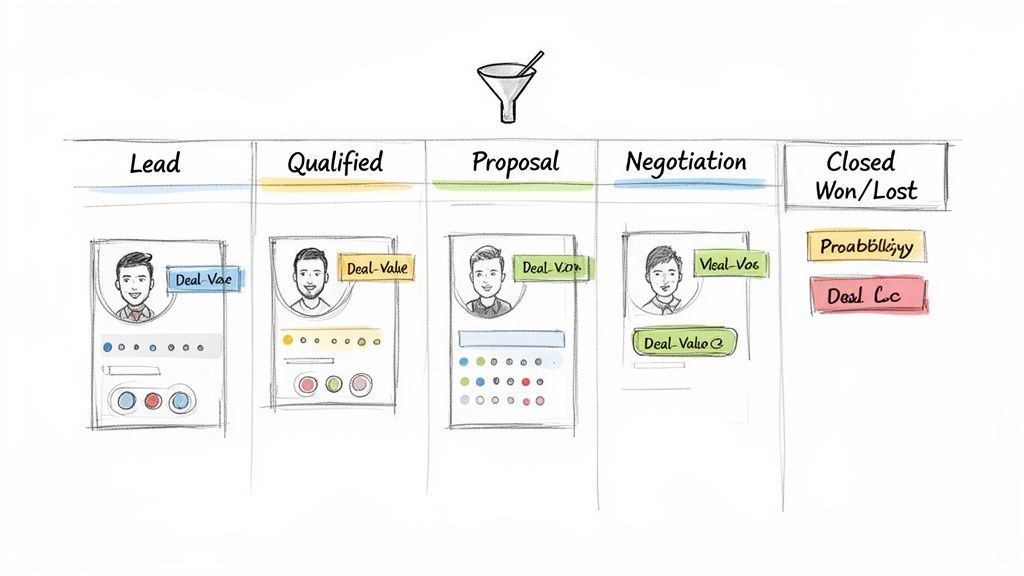
This method, popularized by platforms like HubSpot and Salesforce, excels at improving deal velocity and revenue forecasting. By visualizing every deal's stage, sales managers can quickly identify bottlenecks, such as deals stalling in the Negotiation phase, and allocate resources to push them forward. It provides a real-time, shared understanding of pipeline health.
Strategic Breakdown
Focus: Increase deal velocity and improve sales forecasting accuracy.
Best For: B2B and B2C sales teams of all sizes, especially those managing a high volume of leads with multi-stage sales cycles.
Key Tactic: Implement Service Level Agreements (SLAs) for each stage (e.g., a lead cannot stay in the Proposal column for more than five days without follow-up) to maintain momentum.
Actionable Takeaways
To effectively manage a sales pipeline with Kanban, teams must focus on data discipline and consistent updates. Using card descriptions to summarize deal details, key decision-makers, and next steps ensures everyone is aligned. For a deeper dive into optimizing your sales process, review these sales pipeline management tips to further boost performance. Color-coding cards to indicate deal status, like red for at-risk deals and green for hot prospects, makes pipeline reviews more efficient and is a key reason this is one of the most powerful examples of Kanban for sales professionals.
3. Marketing Campaign and Content Production Kanban
The Marketing Campaign and Content Production Kanban board is an essential tool for modern marketing teams, providing a clear visual pipeline for all content-related activities. This system tracks every piece of content from initial concept to final publication, streamlining collaboration between writers, designers, editors, and stakeholders. Common columns include Idea Backlog, In Production, Design Review, Approval, and Published, creating a transparent and predictable workflow.
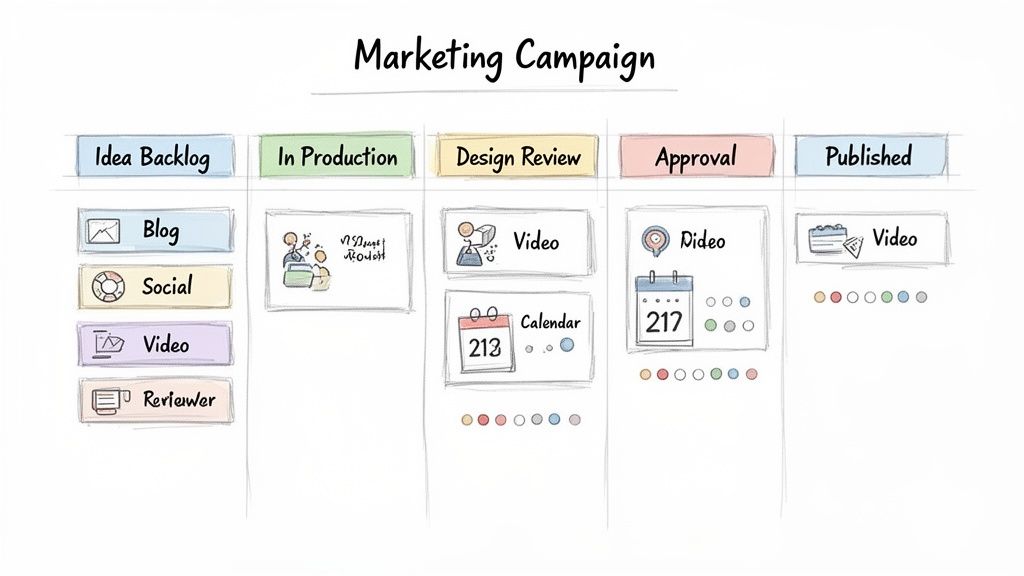
This Kanban example excels at managing the complex, multi-stage approval processes inherent in marketing. It highlights bottlenecks instantly; if the Approval column stacks up, it signals a need to expedite stakeholder feedback. Companies like HubSpot and Buffer use this model to manage vast content calendars, ensuring a consistent and high-quality output across multiple channels while keeping their teams aligned and on schedule.
Strategic Breakdown
Focus: Streamline content creation and campaign execution.
Best For: In-house marketing teams, content agencies, and SaaS companies managing multi-channel campaigns.
Key Tactic: Use labels to categorize content by pillar, campaign theme, or target audience. This allows for strategic prioritization and ensures a balanced content mix.
Actionable Takeaways
To effectively implement this Kanban board, align the columns precisely with your team's specific review and approval workflow. Integrate due dates on cards to keep publication timelines on track and set strict WIP limits on the In Production and Review stages to prevent overload. Linking cards to shared asset folders in Google Drive for drafts, brand guidelines, and design files centralizes information and makes this one of the most practical examples of Kanban for creative teams.
4. Customer Support and Issue Resolution Kanban
The Customer Support and Issue Resolution Kanban board is a dynamic tool for support teams to visualize, manage, and accelerate the resolution of customer tickets. This system provides a transparent overview of all incoming issues, moving them through stages like New Tickets, Assigned, In Progress, Waiting on Customer, and Resolved. It transforms a chaotic inbox into an organized and actionable workflow.
This approach is highly effective because it allows support managers to instantly balance workloads, prioritize urgent requests, and monitor key metrics like response and resolution times. For teams using tools like Zendesk or even managing support through Gmail, a Kanban view provides clarity on ticket status, preventing issues from falling through the cracks and ensuring a consistent customer experience. This visual management is one of the most practical examples of Kanban in a service-oriented environment.
Strategic Breakdown
Focus: Minimize ticket resolution time and improve customer satisfaction.
Best For: SaaS companies, e-commerce businesses, and any organization with a dedicated customer support function.
Key Tactic: Implement strict Service Level Agreements (SLAs) as WIP limits for priority columns (e.g., no more than three "Critical" tickets active at once) to ensure the team focuses on the most urgent customer issues first.
Actionable Takeaways
To maximize the effectiveness of this Kanban board, teams should leverage automation and clear process guidelines. Using card templates for common issue types with pre-defined troubleshooting steps saves time and standardizes responses. Furthermore, the Waiting on Customer column is critical; it isolates tickets that are paused, preventing them from skewing metrics for active work. Conducting weekly retrospectives to review resolved tickets helps identify recurring problems, leading to permanent product or process improvements.
5. Project Management and Deliverable Tracking Kanban
The Project Management and Deliverable Tracking Kanban board is a high-level command center for project managers overseeing complex initiatives. This approach provides a holistic view of an entire project, tracking everything from major milestones and deliverables to critical dependencies across multiple workstreams. Common columns include Planning, To Do, In Progress, Review, and Complete, allowing for a clear visual progression of the project's health and timeline.
This system is particularly effective for managing cross-functional projects where different teams contribute to a shared goal. By visualizing all moving parts, project managers can instantly spot bottlenecks, manage resource allocation, and communicate progress to stakeholders with greater clarity. It serves as a single source of truth, replacing disparate spreadsheets and status update emails.
Strategic Breakdown
Focus: Provide a high-level overview of project health, timeline adherence, and resource management.
Best For: Project managers, program managers, and professional services firms managing multi-faceted projects with cross-functional dependencies.
Key Tactic: Use parent cards for major deliverables or milestones and sub-tasks for the granular work required. This creates a clear hierarchy and simplifies tracking complex workstreams.
Actionable Takeaways
To maximize this board's effectiveness, map all project phases and key deliverables before setup. Use card descriptions to define acceptance criteria and success metrics, ensuring everyone is aligned on what "Done" means. For those deciding between different project visualization tools, understanding the nuances of Kanban vs. Gantt charts can provide crucial insights into which methodology best fits your project's needs. Attaching project charters and timelines directly to relevant cards keeps critical documentation accessible, making this one of the most powerful examples of Kanban for comprehensive project oversight.
6. HR Recruitment and Hiring Pipeline Kanban
The HR Recruitment and Hiring Pipeline Kanban board is a crucial tool for modern human resources teams, transforming the complex hiring process into a clear, manageable workflow. It visualizes the entire candidate journey through distinct stages like Applicants, Phone Screen, Interview, Offer, and Hired. This visual management system helps recruiters and hiring managers track progress, prevent bottlenecks, and ensure no promising candidate gets lost in the process.
This approach is highly effective for reducing time-to-hire and improving the candidate experience. For instance, a fast-growing tech startup can move from cumbersome spreadsheets to a dynamic Kanban board to track applicants for multiple roles simultaneously. By visualizing the pipeline, the team can instantly identify if too many candidates are stuck in the Interview stage, signaling a need to schedule more feedback sessions to keep the process moving.
Strategic Breakdown
Focus: Streamline the hiring workflow and improve candidate pipeline visibility.
Best For: HR departments, recruiting agencies, and startup teams managing talent acquisition.
Key Tactic: Implement Service Level Agreement (SLA) timelines for each stage (e.g., respond to applicants within 48 hours) to maintain momentum and create a positive candidate experience.
Actionable Takeaways
To maximize this board’s effectiveness, attach key documents like resumes, interview scorecards, and feedback summaries directly to each candidate's card. Using labels to categorize candidates by role, seniority, or department allows for quick filtering and prioritization. This is one of the best examples of Kanban for non-technical teams, as it brings clarity and efficiency to a critical business function. To see how other departments can benefit, explore how you can use Kanban for non-technical teams to simplify project tracking across your organization.
7. IT Help Desk and Technical Incident Management Kanban
The IT Help Desk and Technical Incident Management Kanban board is a crucial tool for IT support teams, providing a clear visual system for managing user tickets and resolving technical issues. Inspired by frameworks like ITIL, this board organizes the incident lifecycle into columns such as Reported, Assigned, In Progress, Waiting for User, and Resolved. This structure allows IT managers to balance workloads, prioritize based on severity, and ensure service level agreements (SLAs) are met.
This approach is one of the most practical examples of Kanban for maintaining operational stability. It excels at tracking incident status in real-time, which is vital for distributed IT teams managing cloud infrastructure or supporting users across different time zones. Systems like Jira Service Management and Zendesk have popularized this visual workflow, but even small teams can replicate it using simpler tools.
Strategic Breakdown
Focus: Streamline incident resolution and improve IT service delivery.
Best For: IT help desk teams, Site Reliability Engineering (SRE) groups, and technical support departments of all sizes.
Key Tactic: Align column workflows with specific SLAs. For example, a "Critical" incident must move from Reported to Assigned within 30 minutes, making bottlenecks instantly visible.
Actionable Takeaways
To maximize the effectiveness of this Kanban board, IT teams should create card templates for common incidents like password resets or hardware requests. Attaching relevant documentation, error logs, and knowledge base articles directly to cards reduces resolution time. Incorporating an Escalated column for tickets that breach their SLA helps prioritize critical issues and provides valuable data for weekly incident post-mortems, allowing teams to identify root causes and prevent recurrence.
8. Product Development and Feature Roadmap Kanban
The Product Development and Feature Roadmap Kanban board is a strategic tool for product teams to visualize and manage the entire feature lifecycle. This board translates high-level product strategy into actionable development tasks, ensuring alignment between product managers, developers, and stakeholders. Columns typically include Backlog, Prioritized, In Development, Testing, and Released, offering a clear view of the roadmap's progress from idea to launch.
This method excels in environments of continuous iteration, common in SaaS companies like Stripe and GitHub, by linking execution directly to strategic goals. By centralizing all feature-related information, such as user stories, customer feedback, and design mockups, teams can make informed prioritization decisions and maintain a shared understanding of what’s being built and why. It’s one of the most powerful examples of Kanban for maintaining product-market fit.
Strategic Breakdown
Focus: Align product strategy with development execution and enhance stakeholder communication.
Best For: Product management teams in SaaS, tech startups, and any organization practicing continuous product innovation.
Key Tactic: Integrate customer feedback and usage data directly into feature cards. This ensures that development priorities are consistently validated against real-world user needs and business impact, preventing the team from building features in a vacuum.
Actionable Takeaways
To maximize the effectiveness of a Kanban, establish a rigorous backlog grooming and prioritization process. Use a standardized format for user stories, such as "As a [user], I want [feature] so that [benefit]," to maintain clarity. Furthermore, holding regular roadmap syncs with cross-functional stakeholders ensures everyone is aligned on priorities and progress, which prevents miscommunication and keeps the entire organization moving in the same direction.
9. Event Planning and Coordination Kanban
An Event Planning and Coordination Kanban board is a dynamic tool for managing the multifaceted process of organizing events. It provides a centralized, visual overview of all tasks from initial brainstorming to post-event analysis. Event managers use columns like Planning, Vendor Coordination, In Progress, Final Details, Event Day, and Completed to track every detail, ensuring a seamless experience.
This approach is one of the most effective examples of Kanban for time-sensitive projects with numerous dependencies. It allows teams to manage multiple concurrent events without confusion. For instance, a corporate event coordinator can quickly see the status of vendor payments for a conference while simultaneously tracking marketing promotions for an upcoming webinar, preventing crucial details from being overlooked.
Strategic Breakdown
Focus: Streamline complex event logistics and improve cross-team collaboration.
Best For: Conference organizers, wedding planners, corporate event teams, and nonprofits managing fundraising events.
Key Tactic: Create standardized card templates for recurring event types (e.g., webinar, trade show) to ensure consistency and speed up the planning process for future events.
Actionable Takeaways
To maximize the effectiveness of an Event Planning Kanban, attach all relevant documents like contracts, floor plans, and budget sheets directly to the corresponding cards. Using color-coded labels to differentiate between event types or priorities helps team members quickly identify their most urgent tasks. Setting strict, automated due dates for critical milestones such as vendor confirmations and final payments ensures the entire project stays on schedule and within budget.
10. Legal Document Review and Compliance Kanban
The Legal Document Review and Compliance Kanban board is a critical tool for legal departments and compliance teams, offering a structured visual workflow for managing contracts, policies, and regulatory audits. This system brings clarity and control to high-stakes processes by tracking documents through stages like Submitted, In Review, Awaiting Revision, Final Approval, and Executed. Legal teams can visualize their entire document pipeline, ensuring no contract or compliance check falls through the cracks.
This method excels at managing workloads and tracking the status of numerous documents simultaneously. For corporate legal departments, it provides a transparent way to monitor vendor contracts and manage internal policy reviews. The visual nature of the board immediately highlights bottlenecks, such as a pile-up in the Awaiting Revision column, signaling a need to follow up with business stakeholders to maintain momentum and meet deadlines.
Strategic Breakdown
Focus: Streamline document review cycles and ensure regulatory compliance.
Best For: Corporate legal departments, law firms, and compliance teams managing high volumes of documents.
Key Tactic: Set and monitor Service Level Agreements (SLAs) directly on Kanban cards. For example, a card for a standard contract review could have an SLA of three business days, using due dates to ensure timely turnaround.
Actionable Takeaways
To effectively implement this system, establishing a clear approval hierarchy is paramount. Use color-coded labels to categorize documents by type (e.g., NDA, MSA), priority, and compliance category (e.g., GDPR, SOX). Attaching relevant regulations or precedents to cards gives reviewers immediate context, reducing research time. This approach transforms a complex, opaque process into one of the most organized and efficient examples of Kanban for legal operations.
Comparison of 10 Kanban Use Cases
| Template | 🔄 Implementation Complexity | ⚡ Resource / Efficiency | 📊 Expected Outcomes | Ideal Use Cases | ⭐ Key Advantages |
|---|---|---|---|---|---|
| Software Development Sprint Kanban Board | 🔄 Medium — needs WIP discipline and code-review integration | ⚡ Moderate — developer time + CI/code review tools; Gmail integration reduces switching | 📊 Faster delivery, fewer handoffs, clearer sprint velocity | Agile dev teams running sprints and code reviews | ⭐ Streamlines dev→QA handoffs; native Gmail/code integration; 💡 set WIP limits (2–3) |
| Sales Pipeline and Lead Management Kanban | 🔄 Low–Medium — define stages and lead scoring | ⚡ High — syncs with contacts/CRM to cut data entry | 📊 Improved deal velocity and forecast accuracy | Sales reps and managers tracking deals to close | ⭐ Clear pipeline visibility; email/contact history in one place; 💡 set SLAs per stage |
| Marketing Campaign and Content Production Kanban | 🔄 Medium — approval chains and calendar setup | ⚡ Moderate — content assets and reviewer time required | 📊 Centralized content calendar, fewer approval bottlenecks | Multi-channel marketing teams coordinating campaigns | ⭐ Improves collaboration and publication cadence; 💡 use templates and WIP limits |
| Customer Support and Issue Resolution Kanban | 🔄 Medium — SLA/escalation and ticket integrations needed | ⚡ High — reduces context-switching; speeds responses when integrated | 📊 Lower resolution times and clearer workload allocation | Support teams managing incoming customer tickets | ⭐ Improves accountability and SLA adherence; 💡 use "Waiting on Customer" column |
| Project Management and Deliverable Tracking Kanban | 🔄 High — dependency, resource and milestone management | ⚡ Moderate — PM overhead but reduces reporting effort | 📊 Single source of truth for project health; faster bottleneck detection | PMs overseeing multi-workstream projects | ⭐ Consolidates project status; aids resource leveling; 💡 map phases before setup |
| HR Recruitment and Hiring Pipeline Kanban | 🔄 Low–Medium — candidate privacy and ATS integration considerations | ⚡ Moderate — recruiter time for interviews and docs | 📊 Reduced time-to-hire and fewer lost candidates | Small–mid HR teams managing hiring pipelines | ⭐ Centralizes candidate communications; improves follow-up; 💡 set SLAs per stage |
| IT Help Desk and Technical Incident Management Kanban | 🔄 Medium — SLA tracking and alert integrations required | ⚡ High — improves MTTR when tied to monitoring tools | 📊 Faster incident resolution and balanced technician load | IT support teams and help desks handling incidents | ⭐ Enhances prioritization and runbook access; 💡 establish clear SLAs |
| Product Development and Feature Roadmap Kanban | 🔄 High — cross-functional prioritization and acceptance criteria needed | ⚡ Moderate — PM/engineering collaboration required | 📊 Better alignment of strategy and delivery; reduces scope creep | Product teams managing continuous feature roadmaps | ⭐ Aligns product strategy → execution; enables data-driven prioritization; 💡 define grooming cadence |
| Event Planning and Coordination Kanban | 🔄 Medium — timeline, vendor and budget setup | ⚡ Moderate — requires vendor coordination and asset management | 📊 Fewer last-minute issues and clearer event readiness | Event coordinators managing conferences, webinars, or meetings | ⭐ Centralizes logistics and deadlines; reduces email chaos; 💡 create event templates |
| Legal Document Review and Compliance Kanban | 🔄 High — strict approval hierarchies and secure handling required | ⚡ Low–Moderate — improves visibility but needs secure tooling | 📊 Faster contract turnaround and auditable review trails | Legal and compliance teams managing contracts and audits | ⭐ Streamlines review/approval and auditability; 💡 enforce approval hierarchy & security controls |
From Theory to Practice: Your Turn to Build
We have journeyed through ten distinct examples of Kanban boards, from the fast-paced sprints of a software development team to the meticulous compliance checks of a legal department. Each scenario, whether it was managing a sales pipeline, coordinating a marketing campaign, or resolving IT incidents, reveals a powerful, universal truth: Kanban is not a one-size-fits-all solution, but a highly adaptable framework for visualizing work, limiting work-in-progress, and maximizing efficiency.
The true strength of these examples lies not in their specific column titles or card colors, but in the strategic principles they embody. By making workflows transparent and bottlenecks obvious, teams in any industry can unlock a cycle of continuous improvement.
Key Takeaways for Your Team
As you consider implementing or refining your own Kanban system, remember these core insights drawn from the diverse applications we've explored:
Your Workflow is the Blueprint: The most effective Kanban board is a direct reflection of your team's actual process. Start by mapping out the genuine steps your work takes from "To Do" to "Done," rather than forcing it into a generic template. The Legal Document Review board, with its specialized "Compliance Check" and "Final Signature" stages, is a perfect illustration of this principle.
Visualize Everything: The goal is to make invisible work visible. This includes not just the core tasks but also the blockers, dependencies, and communication gaps. Using visual cues like labels, color-coding for priority (like in the Customer Support example), and dedicated columns for blocked items provides an immediate, at-a-glance understanding of project health.
WIP Limits Drive Focus and Flow: The concept of limiting Work-in-Progress is arguably the most critical and transformative element of Kanban. It prevents team members from becoming overwhelmed, reduces context-switching, and forces the team to confront and resolve bottlenecks before pulling new work into the system. This focus is what turns a simple task board into a high-performance delivery engine.
Your Actionable Next Steps
Feeling inspired by these examples of Kanban? It's time to move from passive learning to active implementation. The journey begins not with complex software, but with a simple, focused conversation.
Map Your Process: Gather your team and whiteboard your current workflow. Identify every distinct stage a task goes through. Don't aim for perfection; just capture the reality of how work gets done today.
Choose Your "Columns": Translate the stages you mapped into the columns for your first Kanban board. Keep it simple to start. You can always add more nuance later.
Start Where You Are: For teams embedded in Google Workspace, the barrier to entry is virtually nonexistent. Instead of introducing yet another platform, you can build these powerful visual systems directly within the tools you already use every single day.
Ultimately, adopting Kanban is about fostering a culture of transparency, collaboration, and incremental progress. It empowers your team to take ownership of their process and provides the clarity needed to make smarter decisions, faster. The examples in this article are your guideposts, but the path forward is uniquely yours to build.
Ready to build a powerful Kanban system without leaving your inbox? The Tooling Studio Kanban Tasks extension transforms your Gmail and Google Tasks into a fully-featured, collaborative Kanban board, allowing you to implement the very strategies discussed in these examples. Start visualizing your workflow and boosting your team's productivity today by visiting Tooling Studio.
 Download our Plugin